REVIEW · ANTWERP
e-Scavenger hunt Antwerp: Explore the city at your own pace
Book on Viator →Operated by Qula · Bookable on Viator
Antwerp is better when you solve something. This e-Scavenger hunt uses an app-led city trail to guide you through central sights, then lets you wander at your own tempo.
I like that it feels like a friendly challenge, not a rigid tour. It’s also built for groups, so you can keep the energy high without herding anyone.
I especially love the flexibility. You pick the day and time, there are no fixed starting times, and the trail runs 24/7. I also love the pace control: you can start, pause, and stop whenever it suits your group.
One key consideration: your success depends on your phone setup. If GPS is weak or your translation app messes with the text, the hunt can feel frustrating instead of fun.
In This Review
- Key things to know before you go
- How the Qula city trail really works (no tour-bus energy)
- Stop-by-stop route: what each checkpoint is doing for you
- Stop 1: Groenplaats
- Stop 2: Grote Markt
- Stop 3: Paleis op de Meir
- Stop 4: Rubenshuis
- Stop 5: Museum Vleeshuis
- Stop 6: Sint-Jacob Antwerpen
- Stop 7: Het Steen
- Stop 8: Cathedral of Our Lady
- Stop 9: Town Hall (Stadhuis)
- Stop 10: St. Anna’s Tunnel / Pedestrians’ Tunnel
- Stop 11: Meir
- Stop 12: Carolus Borromeus Church
- Stop 13: Het Steen (again)
- Stop 14: Vlaeykensgang
- The puzzles: how the fun usually lands
- Value and timing: is $37.41 per group a fair deal?
- Tech setup that prevents most headaches (GPS and translation)
- Who should book this Antwerp e-Scavenger hunt?
- Should you book the e-Scavenger hunt in Antwerp?
- FAQ
- How much does the e-Scavenger hunt Antwerp cost?
- How long does the trail take?
- Do I need a fixed start time?
- What do I need to play on my phone?
- Which languages are available?
- Can I cancel for a refund?
Key things to know before you go

- Start anytime, 24/7: no reservations and no time pressure
- Made for teams up to 6: ideal for families and friend groups
- A loop through Antwerp center: Groenplaats in the start area, then back there again
- Smartphone riddles + assignments: you follow clues while playing on your device
- Multiple languages: English, German, French, Dutch, Spanish, Italian, and more
How the Qula city trail really works (no tour-bus energy)
This is a private self-guided city trail. After you book, you get an email with instructions for playing on your smartphone (Android or iPhone compatible). The ticket is mobile, so you’re not juggling paper vouchers or meeting strangers at a loud kiosk.
Once you reach the starting point at Groenplaats (2000 Antwerpen, Belgium), you begin the quest. That’s it. No guide with a clipboard. No group countdown. The app leads you through checkpoints, and at each one you’ll handle the next riddle or assignment.
The whole experience is designed around your pace. You’re told the trail guides you along the best spots in about 2 hours, but the total duration is listed at around 3 hours. The important part is this: there’s no time limit, so if your group needs extra breaks, you can slow down. If you’re racing friends and trying for a high score, you can also speed up and keep moving.
Also, think of it as an indoor-outdoor hybrid game. Antwerp’s center is walkable, so you’ll be on foot most of the time, but the app handles the structure. That’s a nice trade-off if you want to explore independently without feeling totally lost.
Finally, it’s available 24/7. That matters if you’re doing a trip with restaurant plans, museum hours, or kids who only cooperate on certain parts of the day.
You can also read our reviews of more city tours in Antwerp


Stop-by-stop route: what each checkpoint is doing for you

The trail runs through 14 named stops, then ends back near where you started. The names below are the checkpoints the app uses, so your main job at each one is to arrive, follow the prompt, and solve what’s next. Here’s what that means in practice, and where you might spend a little extra time.
Stop 1: Groenplaats
This is your starting zone. Expect a short onboarding moment: you get going and learn how the app wants you to interact with the trail. If you’re the type who likes a quick warm-up, this is your checkpoint to get the rhythm before the real problem-solving begins.
Stop 2: Grote Markt
This is an early checkpoint in the city-center flow. By the time you reach Grote Markt, your group usually settles into the game. It’s a good place to decide if you’re doing quick solves or taking time to read carefully.
Stop 3: Paleis op de Meir
As you continue, the app keeps your walking route structured while still letting you look around. This is a spot where it’s easy to cluster as a team and compare answers, especially if you’re chasing that top score.




Stop 4: Rubenshuis
Now you’re deep enough into the route that your attention shifts from navigation to teamwork. This is where I’d expect your group dynamic to show: some people will race ahead, while others will slow down to read the clues twice.
Stop 5: Museum Vleeshuis
This checkpoint can work well for a short breather. The app-driven format means you can take a minute without losing the thread. If you’re traveling with anyone who gets tired of constant walking, this kind of built-in pause helps.
Stop 6: Sint-Jacob Antwerpen
By now, you’ve likely done a few riddles and understand how tricky the assignments are. That makes later stops easier, because you’ve trained your brain to the game style.
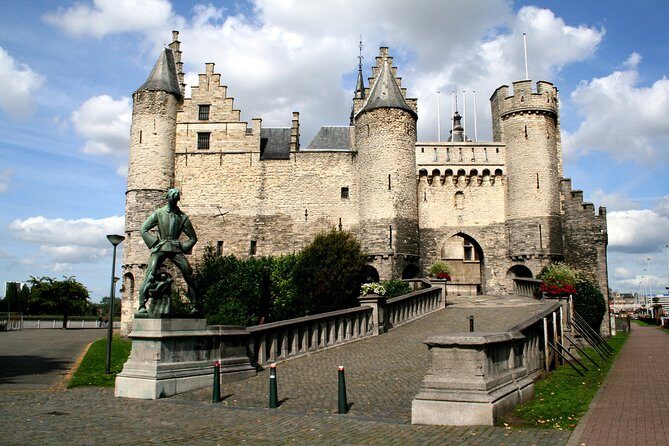
Stop 7: Het Steen
This is one of the route anchor points—central enough that you’ll likely feel the route “turn” around it. It’s also a checkpoint where your team can reset: snack break energy, group photos, and back-to-the-app focus.
Stop 8: Cathedral of Our Lady
This is another big-name stop. Even if you don’t plan any long stops inside, the trail gives you a reason to stand here, solve the next prompt, and keep moving. It’s a good example of the hunt’s style: you get context by simply moving from place to place on purpose.
Stop 9: Town Hall (Stadhuis)
This is a checkpoint that often changes the mood of a scavenger hunt. The architecture of famous civic buildings tends to make people slow down. If your group is competitive, this is also where they’ll try to beat their own timing.
Stop 10: St. Anna’s Tunnel / Pedestrians’ Tunnel
This is the kind of location where the game format can make the walk feel more interesting than a straight stroll. Just keep an eye on your phone signal here, since tunnels can be the exact kind of place where GPS and connectivity get moody.
Stop 11: Meir
Now you’re heading toward the latter part of the city trail. This is often where you start thinking about pace: do you want to keep everything fast to finish near the 2-hour mark, or stretch it out to land closer to the 3-hour average?
Stop 12: Carolus Borromeus Church
This checkpoint is a nice check-in for your group’s progress. If you’re behind, you can tighten up how long each riddle takes. If you’re ahead, you can enjoy the walk without stress.
Stop 13: Het Steen (again)
Yes, the trail brings you back to Het Steen. That second visit is useful if your group likes a loop structure. It also gives you a natural second chance at catching details you might’ve rushed past earlier.
Stop 14: Vlaeykensgang
This is the last named checkpoint in the game route. After this, you’ll still be near your starting area, since the activity ends back at the meeting point at Groenplaats.
The puzzles: how the fun usually lands

The format is straightforward: your smartphone guides you and asks you to solve riddles and complete assignments at each stop. The goal is team-based. If you’re traveling with family or friends, you’ll get the most out of it by splitting roles in a smart way—one person reads the clue out loud, one person handles navigation, and one person does the final check before you commit an answer.
One reason I think this works: it turns “walking between sights” into “figuring out a mini mystery.” Even if you’re not a puzzle person, the checkpoints keep you active and moving. And if you enjoy friendly competition, the app-style setup lets you try for a high score.
The experience is also available in many languages, including English, German, French, Dutch, Spanish, Italian, and more. That makes it easier to keep everyone included, especially in mixed-language groups.
One practical caution from the experience itself: don’t let your phone auto-translate the instructions. The game guidance indicates you must turn off automatic translation, because it can produce awkward or wrong results. If you want the text to make sense, keep the app in the language you chose (or the one your group understands) and avoid extra translation layers.
Value and timing: is $37.41 per group a fair deal?

The price is listed as $37.41 per group (up to 6 people). That’s the key math. You’re paying once for the team, not per person. So the value depends on how many people you bring.
If you’re a couple, you may feel like you’re paying for more of a shared activity than a solo one. If you’re a family of four or a group of friends, it can feel like an affordable way to keep everyone entertained without adding separate tickets or paying for a guide.
Time-wise, it’s also flexible. The trail is described as taking about 3 hours on average, with about 2 hours to cover the main guided highlights. Since there’s no time limit and you can pause, you can stretch it when you want a slower walk or stop when someone needs a break.
A nice bonus: because it’s self-guided, you’re not paying for someone’s schedule. You’re paying for the route and the puzzle engine, and you use it on your terms.
Also, remember what’s not included: smartphone and data are not included. You’ll need your own phone, and you’ll want enough data or suitable settings to keep the app working smoothly. If you’re thinking about using offline maps, make sure your phone can still handle the trail properly.
Tech setup that prevents most headaches (GPS and translation)

I’m going to be blunt here: this hunt lives or dies on your phone. The activity clearly expects you to use a smartphone with GPS behavior that works well enough to guide you between checkpoints.
If GPS is weak on your device, you may end up using a regular paper map or another navigation method to keep moving between stops. One phone can be fine while another one struggles in the same area, so it’s worth doing a quick test before you commit your whole group to solving.
Here are the setup tips I’d follow:
- Before you start, confirm the app instructions are readable in your chosen language.
- Turn off automatic translation if it’s enabled on your phone, because automatic translation can lead to weird results and make riddles feel broken.
- Check GPS permissions for the app. Some phones need you to allow location access and keep location services on.
- Since data isn’t included, plan for how you’ll stay connected long enough for the trail to function.
If something still goes wrong, there is a support path. The provider’s response mentions contacting the Supportdesk, and it also references a guarantee where you can get your money back if you don’t like the game. That’s not a free pass to ignore tech. It is a safety net.
Who should book this Antwerp e-Scavenger hunt?
This is a smart pick if you want a low-structure way to explore central Antwerp. You get a walking route, checkpoints, and prompts, but you still choose how long you linger.
It’s especially good for:
- Families: scavenger hunts tend to keep kids engaged without needing constant adult entertainment
- Groups of friends (up to 6): teamwork and score-chasing are built into the format
- People who like planning less: you can pick a start time that matches your day
It can also be a decent option if you have someone who benefits from user-friendly support for hearing impaired. The activity lists that it’s user-friendly in that respect. Service animals are also allowed, and it’s near public transportation, which helps if you’re not starting right from your hotel.
On the other hand, if your group hates anything tech-dependent, or you expect perfect GPS at all times, you might feel more stress than fun.
Should you book the e-Scavenger hunt in Antwerp?
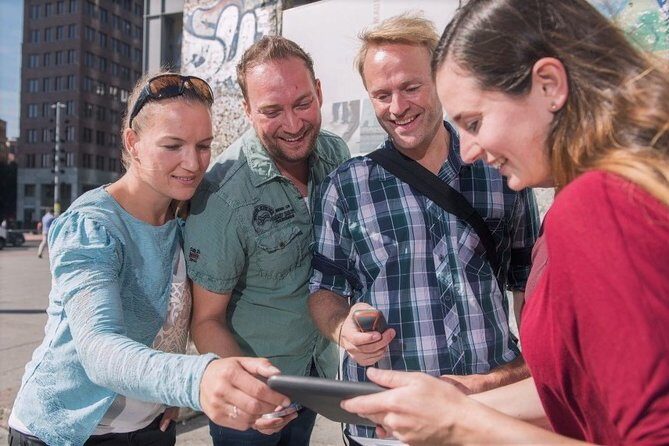
If you want a fun way to see the Antwerp center without committing to a live guide, I’d book it. The flexibility is real: start when you want, pause when you need to, and take as long as you want. At the group price—up to 6 people—it’s one of those activities that can be cheaper than a more traditional guided option.
I’d think twice if:
- your group wants zero phone involvement
- your phone often struggles with GPS
- you rely heavily on automatic translation tools and can’t turn them off
If you can handle those two setup points—GPS permissions and translation settings—you’ll likely enjoy the mix of walking, solving, and light competition.
FAQ

How much does the e-Scavenger hunt Antwerp cost?
It costs $37.41 per group, and the trail is designed for groups of up to 6 people.
How long does the trail take?
It takes about 3 hours (approx.). The app guides you through the best spots in about 2 hours, and there’s no time limit, so you can go longer.
Do I need a fixed start time?
No. There are no fixed starting times or reservations. You pick your own day and time, and the trail is available 24/7.
What do I need to play on my phone?
After booking, you receive an email with instructions to play on your smartphone. The activity is compatible with Android and iPhone. You’ll need your own smartphone, and the trail requires smartphone and data are not included.
Which languages are available?
The trail is offered in multiple languages, including English, German, French, Dutch, Spanish, and Italian, plus more.
Can I cancel for a refund?
Yes. You can cancel for a full refund if you cancel up to 24 hours in advance. If you cancel less than 24 hours before the start time, the amount paid is not refunded.